

Two Ways To Start Internet Explorer and Go to the Internet PowerPoint PPT Presentation
1 / 5
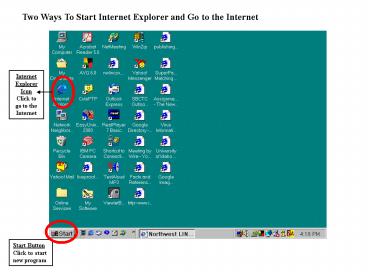
Title: Two Ways To Start Internet Explorer and Go to the Internet
1
Two Ways To Start Internet Explorer and Go to the
Internet
Internet Explorer Icon Click to go to the Internet
Start Button Click to start new program
2
How to move around Internet Explorer and the Web
Back Button Click to move Back on page.
Scroll Bar Drag to move Down the Page.
Forward Button Click to move forward one page.
When the mouse pointer changes to a hand you may
click on that link.
3
How to move to a new page with Internet Explorer
Address bar Type in Internet Address to move To
another page
Hyper Link Click when the mouse Pointer changes
to a hand
4
To Shut Down Windows Step 1
Start Button Click to Shut Down Windows
Shut Down Click to Shut Down Windows
5
To Shut Down Windows Step 2
Shut Down Dialog Box Select Shut Down Click OK
Recommended

