

The Full Memory Hierarchy always reuse a good idea PowerPoint PPT Presentation
1 / 114
Title: The Full Memory Hierarchy always reuse a good idea
1
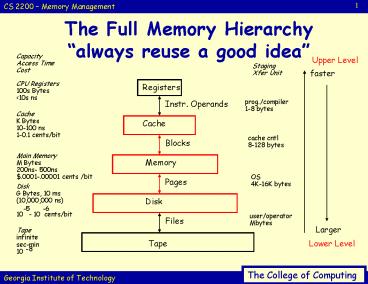
The Full Memory Hierarchyalways reuse a good
idea
Capacity Access Time Cost
Upper Level
Staging Xfer Unit
faster
CPU Registers 100s Bytes lt10s ns
Registers
prog./compiler 1-8 bytes
Instr. Operands
Cache K Bytes 10-100 ns 1-0.1 cents/bit
Cache
cache cntl 8-128 bytes
Blocks
Main Memory M Bytes 200ns- 500ns .0001-.00001
cents /bit
Memory
OS 4K-16K bytes
Pages
Disk G Bytes, 10 ms (10,000,000 ns) 10 - 10
cents/bit
Disk
-5
-6
user/operator Mbytes
Files
Larger
Tape infinite sec-min 10
Tape
Lower Level
-8
2
Where can a block be placed in a cache?
Fully Associative
Direct Mapped
Set Associative
1 2 3 4 5 6 7 8
1 2 3 4 5 6 7 8
1 2 3 4 5 6 7 8
Cache
Set 0
Set 1
Set 2
Set 3
Block 12 can go anywhere
Block 12 can go only into Block 4 (12 mod 8)
Block 12 can go anywhere in set 0 (12 mod 4)
1 2 3 4 5 6 7 8 9..
Memory
12
3
An example the Alpha 20164 data and instruction
cache
Block Addr.
Block Offset
lt21gt
lt8gt
lt5gt
1
CPU Address
Tag
Index
4
Data in
Data out
Valid lt1gt
Tag lt21gt
Data lt256gt
(256 blocks)
2
...
Write Buffer
41 Mux
3
?
Lower level memory
4
Multilevel cachesRecall 1-level cache numbers
Processor
cache
1nS
AMAT Thit (1-h) Tmem 1nS
(1-h) 100nS hit rate of 98 would yield an
AMAT of 3nS ... pretty good!
BIG SLOW MEMORY
100nS
5
Multilevel CacheAdd a medium-size, medium-speed
L2
Processor
AMAT Thit_L1 (1-h_L1)
Thit_L2 ((1-h_L1)
(1-h_L2) Tmem) hit
rate of 98in L1 and 95 in L2 would yield an
AMAT of 1 0.2 0.1 1.3nS -- outstanding!
L1 cache
1nS
L2 cache
10nS
BIG SLOW MEMORY
100nS
6
CPI of system
- CPI from the processor
- Addition to the CPI caused by misses
- CPItotal CPIproc (1-h)Misspenalty_in_cycles
- Example (see board)
- CPIproc 1.2
- h 95
- Miss 100nS
7
Review
- (Question on the board)
8
Main Memory some opening comments
- Next level down in memory hierarchy after the
cache - Its the interface between I/O and the cache
- Performance measures for memory include both
latency and bandwidth - Main memory latency affects cache performance
- Main memory bandwidth affects I/O
- Can also affect larger, L2 caches
- Increased block size may help here if the
bandwidth is high
9
Main memory (some definitions)
- Latency is usually measured with 2 metrics
- Access time
- time b/t when a read is requested and the desired
word arrives - Cycle time
- minimum time b/t requests to memory
10
Main memory (more definitions)
- DRAM subtle hint what does the D stand for?
- DRAM is Dynamic RAM
- 1 transistor is used to store a bit of info.
- Each bit must be refreshed periodically
- .or else the information (stored by charge) can
bleed off and well lose our data - Fortunately, simply reading all of the
information in RAM at various time intervals can
fix - Unfortunately, if we read to refresh, we cant do
a read to well.. read! - Time is usually the time for a full memory access
11
Main memory (more definitions)
- What about SRAM? Heck, what IS SRAM?
- SRAM uses 4-to-6 transistors per bit
- Information is not disturbed when read
- Unlike DRAMs there is no need to refresh SRAM
- and no difference in access and cycle time
- Emphasis with DRAM is on capacity on SRAM speed
- The bottom line
- DRAM is about 4-8 times denser than SRAM
- Cycle time wise, SRAM is 8-16 times faster than
DRAM - wise, SRAM is 8-16 times more expensive than
DRAM
12
How can memory be organized?
Interleaved
CPU
Cache
Bus
Mem. Bank 1
Mem. Bank 2
Mem. Bank 3
Mem. Bank 4
13
The basic configuration(1-word wide) (
example)
- Given
- Cache block size of 4 words
- 1 CC to send address (need to send once)
- 10 CCs for each DRAM access initiated
- 1 CC to send a word of data on the bus
Miss penalty address time accesses x (access
time send time) 1 4 (10 1) 45 clock
cycles Bytes transferred per clock cycle (4
words 4 bytes/word) / 45 0.36 bytes/cycle
14
Higher bandwidth, wider memory
- If we double or quadruple the width of the
cache/memory - we need to double or quadruple the memory
bandwidth - Of course we have to pay for this
- Need a wider connection between the CPU and
memory (memory bus). - But, CPUs will still access data a word at a
time - so we need a multiplexor between the cache and
the CPU - and that multiplexor might be part of the
critical path. - Another problem users can expand memory
15
The wide configuration ( example)
- Given
- Main memory width of 4 words
- Same cache/memory parameters as before
Miss penalty address time accesses x
(access time send time) 1 1 (10 1)
12 clock cycles Bytes transferred per clock
cycle (4 words 4 bytes/word) / 12 1.33
bytes/cycle
16
Higher bandwidth, interleaved memory
- With many DRAM chips can interleave to get
parallelism - Organize to read or write multiple words at a
time instead of just 1 - Try to get more bandwidth by using all DRAMs
- From picture
- banks are usually 1 word wide
- but bus width stays the same
- Saves hardware, addresses just sent at the same
time - Banks also valuable on writes
- Before, back-to-back writes wait for others to
finish - Banks allow 1 cycle for each write (if not to
same bank)
17
The interleaved configuration ( example)
- Given
- 4 parallel, interleaved memory banks, each 1 word
wide - Same cache/memory parameters as before
Miss penalty address time accesses x
(access time send time) 1 10 (41) 15
clock cycles Bytes transferred per clock cycle
(4 words 4 bytes/word) / 15 1.1
bytes/cycle
18
Virtual Memory
- Some facts of computer life
- Computers run lots of processes simultaneously
- No full address space of memory for each process
- Must share smaller amounts of physical memory
among many processes - Virtual memory is the answer!
- Divides physical memory into blocks, assigns them
to different processes
Compiler assigns data to a virtual address. VA
translated to a real/physical somewhere in
memory (allows any program to run
anywhere where is determined by a particular
machine, OS)
19
Implementation
- We have multiple processes in memory
- Only one is active
- We load the relocation and limit register for the
process that is running - We might store the relocation and limit register
values for non-running jobs in their PCB - The OS must manage this
20
Relocation in HardwareBase and Bound registers
physical address space
Processor
SEGV trap
lt(bd-bs)
base
bound
Memory
(bound - base)
base
0
21
Multiple Partition Allocation
- Want multiple users in memory at same time
- Simple technique MFT (OS/360)
- Fixed size partitions
- One process per partition
- Didnt seem too flexible in 1966!
- More Flexible MVT
- Start with OS and large free space
- Free space (or spaces) known as hole (or holes)
22
OS
P1 600
P2 1000
P3 300
23
OS
P1 600
P3 300
24
OS
P1 600
P4 700
P3 300
25
OS
P4 700
P3 300
26
OS
P5 500
P4 700
P3 300
27
Fragmentation
- External
- Space between processes
- Over time using N blocks may result in 0.5N
blocks being unused - Internal Fragmentation
- For the sake of efficiency typically give process
more than is needed - Solution Compaction
- May be costly
- But need contiguous spaces!
28
Comments?
- Problems?
- Difficulties?
- Challenges?
- Algorithms?
29
Virtual Memory
- Some facts of computer life
- Computers run lots of processes simultaneously
- No full address space of memory for each process
- Must share smaller amounts of physical memory
among many processes - Virtual memory is the answer!
- Divides physical memory into blocks, assigns them
to different processes
Compiler assigns data to a virtual address. VA
translated to a real/physical somewhere in
memory (allows any program to run
anywhere where is determined by a particular
machine, OS)
30
Whats the right picture?
Physical Address Space
Logical Address Space
31
Whats the right picture?
Logical Address Space
Physical Address Space
32
The gist of virtual memory
- Relieves problem of making a program that was too
large to fit in physical memory well.fit! - Allows program to run in any location in physical
memory - (called relocation)
- Really useful as you might want to run same
program on lots machines
Logical program is in contiguous VA space here,
consists of 4 pages A, B, C, D The physical
location of the 3 pages 3 are in main memory
and 1 is located on the disk
33
Foreshadowing
Virtual address
Virtual page Page offset
Main Memory
Page Table
Physical address
Physical page here
34
Foreshadowing32-byte memory with 4-byte pages
Physical memory 0 1 2 3 4 i 5 j 6 k 7 l 8 m 9 n 10
o 11 p 12 13 14 15 16 17 18 19 20 a 21 b 22 c 23
d 24 e 25 f 26 g 27 h 28 29 30 31
Logical memory 0 a 1 b 2 c 3 d 4 e 5 f 6 g 7 h 8 i
9 j 10 k 11 l 12 m 13 n 14 o 15 p
Page Table
0 1 2 3
5 6 1 2
35
Virtual Memory
- Virtual memory is a kind of cache DRAM is used
as a cache for disk. - Why does it work?
- How did it work?
36
Virtual Memory
- Virtual memory is a kind of cache DRAM is used
as a cache for disk. - Why does it work?
- locality! phenomena of locality means that you
tend to reuse the same locations - How did it work?
- 1. find block in upper level (DRAM) via page
table (a map) - 2. replace least-recently-used (LRU) page on a
miss
37
Some definitions and cache comparisons
- The bad news
- In order to understand exactly how virtual memory
works, we need to define some terms - The good news
- Virtual memory is very similar to a cache
structure - So, some definitions/analogies
- A page or segment of memory is analogous to a
block in a cache - A page fault or address fault is analogous to
a cache miss
real/physical memory
so, if we go to main memory and our data isnt
there, we need to get it from disk
38
More definitions and cache comparisons
- These are more definitions than analogies
- With VM, CPU produces virtual addresses that
are translated by a combination of HW/SW to
physical addresses - The physical addresses access main memory
- The process described above is called memory
mapping or address translation
39
More definitions and cache comparisons
- Back to cache comparisons
40
Even more definitions and comparisons
- Replacement policy
- Replacement on cache misses primarily controlled
by hardware - Replacement with VM (i.e. which page do I
replace?) usually controlled by OS - B/c of bigger miss penalty, want to make the
right choice - Sizes
- Size of processor address determines size of VM
- Cache size independent of processor address size
41
Virtual Memory
- Timings tough with virtual memory
- AMAT Tmem (1-h) Tdisk
- 100nS (1-h) 25,000,000nS
- h (hit rate) had to be incredibly (almost
unattainably) close to perfect to work - so VM is a cache but an odd one.
42
Virtual memory block size
- Virtual memory systems can have either
- Fixed block sizes called pages or
- variable block sizes called segments
- A picture is worth 1000 words
Code
Data
Paging
Segmentation
43
More on segments vs. pages
- Decision to use paged VM versus segmented VM
affects the CPU - Paged addressing has a single fixed-size address
divided into a page number and an offset within a
page - Analogous to cache addressing actually
- A single address does not work for a segmented
address - Need one word of an offset within a segment and
one for a segment number - Unsegmented addresses are easier for the compiler
44
A clear explanation of pages vs. segments!
Segments
Paging
(Much like a cache!)
(Pages no longer the same size)
Virtual Address
Now, 2 fields of the virtual address have
variable length
Page
Offset
- One specifies the segment
- Other offset wi/page
Segment
Offset
Segment
Offset
Offset
Frame
The Problem This length can vary
Can concatenate physical address w/offset as
all pages the same size
Offset takes you to specific word
45
Segment Tables
- Each entry contains the starting address of the
corresponding segment in main memory - Each entry contains the length of the segment
- A bit is needed to determine if segment is
already in main memory - A bit is needed to determine if the segment has
been modified since it was loaded in main memory
46
Segmentation
Virtual Address
Segment Number
Offset
Segment Table Entry
Other Control Bits
Length
Segment Base
P
M
For bound checking
47
Address Translation in a Segmentation System
This could use all 32 bits cant just
concatenate
48
Address Translation in a Paging System
49
Block placement
- Where can a block be placed in main memory?
- We want a low, low, low, miss rate
- Because the miss penalty for virtual memory
forces us to go off to disk - Which is very very slow as well see in I/O
lectures - So, if given a choice of a simple placement
algorithm - Like a direct mapped cache
- or a low miss rate
- Wed choose the miss rate
- So main memory is fully associative and a block
can go anywhere!
50
Searching for a block
- How is a block found in main memory?
- Both pages and segments rely on a data structure
that is indexed by a page or a segment - Data structure contains the physical address of
the block - Segmentation offset added to the segments
physical address to obtain the final physical
address - For paging, offset concatenated to this physical
page address - Data structure that contains the physical page
addresses is called a page table - Page table indexed by the virtual page number
- Size of table is the of pages in VA space
51
Pages versus segments
52
Searching for a block
Virtual address
Virtual page Page offset
Main Memory
Page Table
Physical address
53
Paging
- Solution to external fragmentation.
- Divide logical address space into non-contiguous
regions of physical memory. - Commonly used technique in many operating systems.
54
Basic Method(more detail, more terms)
- Break Physical memory into fixed-sized blocks
called Frames. - Break Logical memory into the same-sized blocks
called Pages. - Disk also broken into blocks of the same size.
55
Paging Hardware
Physical Memory
32
32
CPU
page
offset
frame
offset
page table
page
frame
56
Paging Hardware
Physical Memory
How big is a page? How big is the page table?
32
32
CPU
page
offset
frame
offset
page table
page
frame
57
Paging Hardware
Physical Memory
How big is a page? 4K-16KB ...
lets use 4KB How big is the page table?
12
32
32
CPU
page
offset
frame
offset
20
20
page table
page
frame
58
How big is a page table?
- Suppose
- 32 bit architecture
- Page table 4 kilobytes
- Therefore
Offset 212
Page Number 220
59
How big is a Page Table Entry
- Need physical page number 20 bits
- Protection Information?
- Pages can be
- Read only
- Read/Write
- missing entirely(!) (invalid)
- Possibly other info
- So, how big is a page table?
- 220 PTE x 4 bytes/entry 4 MB
60
Decimal Example
Physical Memory
Block size 1000 words Memory 1000
Frames Memory ?
CPU
page
offset
frame
offset
page table
page
frame
61
Decimal Example
Physical Memory
Block size 1000 words Memory 1000
Frames Memory 1,000,000
CPU
page
offset
frame
offset
page table
page
frame
62
Decimal Example
Physical Memory
Block size 1000 words Memory ? Frames Memory
10,000,000
CPU
page
offset
frame
offset
page table
page
frame
Assume addresses go up to 10,000,000. How big
is page table?
63
Decimal Example
Physical Memory
Block size 1000 words Memory 10,000
Frames Memory 10,000,000 words
CPU
page
offset
frame
offset
page table
page
10,000 Entries
frame
Assume addresses go up to 10,000,000. How big
is page table?
64
Decimal Example
Physical Memory
Block size 1000 words Memory 10,000
Frames Memory 10,000,000 words
CPU
42
356
256
356
page table
256
42
65
Tiny Example32-byte memory with 4-byte pages
Physical memory 0 1 2 3 4 i 5 j 6 k 7 l 8 m 9 n 10
o 11 p 12 13 14 15 16 17 18 19 20 a 21 b 22 c 23
d 24 e 25 f 26 g 27 h 28 29 30 31
Logical memory 0 a 1 b 2 c 3 d 4 e 5 f 6 g 7 h 8 i
9 j 10 k 11 l 12 m 13 n 14 o 15 p
Page Table
0 1 2 3
5 6 1 2
66
Example
- Given 4KB pages (212), 4 bytes per page table
entry, 28 bit virtual address, how big is the
page table?
67
Test Yourself
- A processor asks for the contents of virtual
memory address 0x10020. The paging scheme in use
breaks this into a VPN of 0x10 and an offset of
0x020. - PTR (a CPU register that holds the address of the
page table) has a value of 0x100 indicating that
this processes page table starts at location
0x100. - The machine uses word addressing and the page
table entries are each one word long.
68
Test Yourself
- ADDR CONTENTS
- 0x00000 0x00000
- 0x00100 0x00010
- 0x00110 0x00022
- 0x00120 0x00045
- 0x00130 0x00078
- 0x00145 0x00010
- 0x10000 0x03333
- 0x10020 0x04444
- 0x22000 0x01111
- 0x22020 0x02222
- 0x45000 0x05555
- 0x45020 0x06666
- What is the physical address calculated?
- 10020
- 22020
- 45000
- 45020
- none of the above
69
Test Yourself
- ADDR CONTENTS
- 0x00000 0x00000
- 0x00100 0x00010
- 0x00110 0x00022
- 0x00120 0x00045
- 0x00130 0x00078
- 0x00145 0x00010
- 0x10000 0x03333
- 0x10020 0x04444
- 0x22000 0x01111
- 0x22020 0x02222
- 0x45000 0x05555
- 0x45020 0x06666
- What is the physical address calculated?
- What is the contents of this address returned to
the processor? - How many memory accesses in total were required
to obtain the contents of the desired address?
70
Where is the Page Table?
M X
1
P C
Instr Mem
DPRF
BEQ
A
Data Mem
M X
M X
D
SE
WB
EX
MEM
ID
IF
71
Valid/Invalid Bit
- Before
- Used to indicate a page that the process was not
allowed to use - Encountering absolutely meant an error had
occurred.
- Now
- Indicates either the page is still on disk OR the
page is truly invalid - The PCB must contain information to allow the
processor to determine which of the two has
occurred
72
Page Fault
Disk
Physical Memory
Operating System
CPU
42
356
356
page table
i
73
Page Fault
Physical Memory
Operating System
CPU
42
356
356
page table
i
74
Page Fault
Physical Memory
Operating System
TRAP!
CPU
42
356
356
page table
i
75
Page Fault
OpSys says page is on disk
Physical Memory
Operating System
CPU
42
356
356
page table
i
76
Page Fault
Small detail OpSys must somehow maintain list of
what is on disk
Physical Memory
Operating System
CPU
42
356
356
page table
i
77
Page Fault
Physical Memory
Operating System
CPU
42
356
356
page table
i
78
Page Fault
Physical Memory
Operating System
CPU
42
356
356
page table
Free Frame
i
79
Page Fault
Physical Memory
Operating System
CPU
42
356
356
page table
i
80
Page Fault
Physical Memory
Operating System
CPU
42
356
356
page table
295
v
81
Page Fault
Physical Memory
Operating System
CPU
42
356
356
Restart Instruction
page table
295
v
82
Page Fault
Physical Memory
Operating System
CPU
42
356
295
356
page table
295
v
Now it works fine!
83
Block replacement
- Which block should be replaced on a virtual
memory miss? - Again, well stick with the strategy that its a
good thing to eliminate page faults - Therefore, we want to replace the LRU block
- Many machines use a use or reference bit
- Periodically reset
- Gives the OS an estimation of which pages are
referenced
84
Writing a block
- What happens on a write?
- We dont even want to think about a write through
policy! - Time with accesses, VM, hard disk, etc. is so
great that this is not practical - Instead, a write back policy is used with a dirty
bit to tell if a block has been written
85
Mechanism vs. Policy
- Mechanism
- paging hardware
- trap on page fault
- Policy
- fetch policy when should we bring in the pages
of a process? - replacement policy which page should we evict
given a shortage of frames?
86
Fetch Policy
- 1. load all pages at the start of the process
- 2. load only on demand demand paging
87
Demand Paging
- Paging systems
- Swapping systems
- Combine the two and make the swapping lazy!
- Remember the invalid bit?
Page Table
88
Performance of Demand Paging
- Assume probability of page fault is p
- So 0 ? p ? 1
- Effective access time
- (1 - p) x ma p x pageFaultTime
89
Page Fault
OpSys says page is on disk
Physical Memory
Operating System
CPU
Restart Instruction
page table
i
90
Performance of Demand Paging
- Assume probability of page fault is p
- So 0 ? p ? 1
- Effective access time
- (1 - p) x ma p x pageFaultTime
- (1 - p) x 100 p x 25,000,000
- 100 24,999,990 x p
- If p 0.001
- Effective access time 25 ?sec (250xs!)
91
Performance of Demand Paging
- If we want only 10 degradation in performance
- (i.e. what were willing to accept)
- 110 gt 100 25,000,000 x p
- 10 gt 25,000,000 x p
- p lt 0.0000004.
- Thus, 1 memory access in 2,500,000 can page
fault.
92
Replacement Policy
- Given a full physical memory, which page should
we evict??
93
Phenomena
- Locality
- Working Set
94
Replacement Policy
- Random
- FIFO First-in-first-out
- LRU Least-Recently-Used
- MRU Most-Recently-Used
- OPT (will-not-be-used-farthest-in-future)
95
Replacement Policy Simulation
- example sequence of page numbers
- 0 1 2 3 42 2 37 1 2 3
- FIFO?
- LRU?
- OPT?
96
LRU Implementation
- How do you keep track of LRU info? (another data
structure question)
97
Multi-level Page Tables
- Sometimes described as paging the page table
Page 1
Page 2
Offset
Physical Memory
Outer Page Table
Page of Page Table
98
Page Table in Memory?
Physical Memory
CPU
42
356
256
356
page table
256
42
99
Two Problems
- 1. its slow! Weve turned every access to
memory into two accesses to memory - 2. its still huge!
100
Two Problems
- 1. its slow! Weve turned every access to
memory into two accesses to memory - solution add a specialized cache called a
translation lookaside buffer (TLB) inside the
processor - punt this issue for a lecture (until Thursday)
- 2. its still huge!
- even worse were ultimately going to have a page
table for every process. Suppose 1024 processes,
thats 4GB of page tables!
101
How can we translate an address fast?
- Page tables are usually pretty big
- Consequently, theyre stored in main memory
- So, if we want to get data from a memory address
- we usually need 2 memory references!
- 1 to figure out where the actual data is, given
an address - Another to actually go and get the data
- We can again invoke the principle of locality
to try to speed the process up - Keep some of address translations in special
cache - Called Translation Look-aside Buffer (TLB)
- TLB is like a cache entry tag holds portion of
virtual address, data is a physical page frame ,
protection field, valid bit, dirty bit, etc.
102
An example of a TLB
- Well look at the TLB for the Alpha 20164 (32
entries) - The TLB for this processor is fully-associative
- So, we need to send the virtual address to all of
the tags - Why is fully associative a good thing?
- Next, check to see if the tag is valid or not
- Simultaneously check the type of memory access
for protection violations - The matching tag sends the corresponding physical
address to a 321 multiplexor - The page offset is then combined with the
physical page frame to form a full 34-bit address
103
An example of a TLB
Page Offset
Page frame addr.
Read/write policies and permissions
lt30gt
lt13gt
1
2
V lt1gt
Tag lt30gt
Phys. Addr. lt21gt
R lt2gt
W lt2gt
(Low-order 13 bits of addr.)
lt13gt
...
4
34-bit physical address
(High-order 21 bits of addr.)
321 Mux
3
lt21gt
104
Another view
105
Paging/VM
Disk
Physical Memory
Operating System
CPU
42
356
356
page table
i
106
Paging/VM
Disk
Physical Memory
Operating System
CPU
42
356
356
Place page table in physical memory However this
doubles the time per memory access!!
107
Paging/VM
Disk
Physical Memory
Operating System
CPU
42
356
356
Cache!
Special-purpose cache for translations Historicall
y called the TLB Translation Lookaside Buffer
108
Translation Cache
Just like any other cache, the TLB can be
organized as fully associative, set
associative, or direct mapped TLBs are usually
small, typically not more than 128 - 256 entries
even on high end machines. This permits
fully associative lookup on these machines.
Most mid-range machines use small n-way
set associative organizations. Note 128-256
entries times 4KB-16KB/entry is only
512KB-4MB the L2 cache is often bigger than the
span of the TLB.
hit
miss
VA
PA
TLB Lookup
Cache
Main Memory
CPU
Translation with a TLB
hit
miss
Trans- lation
data
109
Translation Cache
A way to speed up translation is to use a special
cache of recently used page table entries
-- this has many names, but the most
frequently used is Translation Lookaside Buffer
or TLB
Virtual Page Physical Frame Dirty
Ref Valid Access
tag
Really just a cache (a special-purpose cache) on
the page table mappings TLB access time
comparable to cache access time (much less
than main memory access time)
110
4 General Questionsfor Memory Hierarchy
- Q1 Where can a block be placed in the upper
level? (Block placement) - Q2 How is a block found if it is in the upper
level? (Block identification) - Q3 Which block should be replaced on a miss?
(Replacement policy) - Q4 What happens on a write? (Write strategy)
111
Compare 4 General Questionsall-HW vs VM-style
caching (small blocks vs. large blocks)
- Q1 Where can a block be placed in the upper
level? HW N sets VM always
full-assoc. - Q2 How is a block found if it is in the upper
level? HW match on tags VM lookup via
map - Q3 Which block should be replaced on a miss?
HW LRU/random VM pseudo-LRU - Q4 What happens on a write? HW WT or WB
VM always WB
112
Page sizes
- Do we want a large page size or a smaller one?
- Larger page sizes are good because
- Size of page table is inversely proportional to
the page size memory can be saved by making the
pages bigger! - Larger page sizes simplify fast cache hit times
- Transferring larger chunks of memory at a time is
more efficient than transferring smaller ones - The of TLB entries are restricted
- Larger page sizes mean more efficient memory
mappings, fewer TLB misses - Argument for smaller page sizes less
fragmentation - Multiple page sizes are the compromise
113
The big picture and TLBs
- Address translation is usually on the critical
path - which determines the clock cycle time of the mP
- Even in the simplest cache, TLB values must be
read and compared - TLB is usually smaller and faster than the
cache-address-tag memory - This way multiple TLB reads dont increase the
cache hit time - TLB accesses are usually pipelined b/c its so
important!
114
The big picture and TLBs
TLB access
Virtual Address
Yes
No
TLB Hit?
Yes
No
Try to read from page table
Write?
Try to read from cache
Set in TLB
Page fault?
Cache/buffer memory write
Yes
Yes
No
No
Cache hit?
Replace page from disk
TLB miss stall
Cache miss stall
Deliver data to CPU
Recommended

