

How to insert a picture from the Clip Art Gallery. PowerPoint PPT Presentation
Title: How to insert a picture from the Clip Art Gallery.
1
How to insert a picture from the Clip Art Gallery.
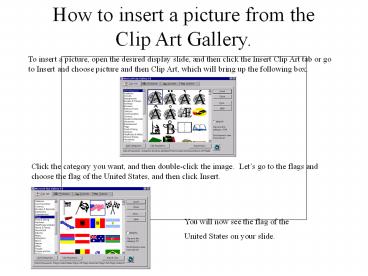
To insert a picture, open the desired display
slide, and then click the Insert Clip Art tab or
go to Insert and choose picture and then Clip
Art, which will bring up the following box.
Click the category you want, and then
double-click the image. Lets go to the flags
and choose the flag of the United States, and
then click Insert.
You will now see the flag of the United States
on your slide.
2
Changing the look of your font.
First, go to Format and then choose Font. The
following box will appear.
In this box, you can choose your font, font
style, font size and font color.
Lets choose Tahoma, bold, size 16 and color red.
You now know how to change the look of your font.
3
Changing the order of the slides.
You will see a screen like following.
When you have several number of slides, and you
want to change the order, go to view and slide
sorter.
Just swap the slides to change the order.
Recommended

