

How to Upload the Edited Meta Information to DVDFab PowerPoint PPT Presentation
Title: How to Upload the Edited Meta Information to DVDFab
1
- How to Upload the Edited Meta Information to
DVDFab? - After completing the Meta information
edit, by uploading the edited meta information to
DVDFab, you will get corresponding award, which
can be used to accumulate to exchange Amazon gift
card. - Following are the detailed steps about
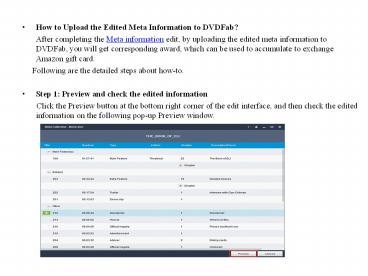
how-to. - Step 1 Preview and check the edited information
- Click the Preview button at the bottom
right corner of the edit interface, and then
check the edited information on the following
pop-up Preview window.
2
- All categories are unfolded, and the information
is read-only. - If you think there is something wrong with the
edited information, click the Back button, you
will back to the Meta information edition window. - Step 2 Upload the edited information after
preview - If you have checked all the information you
edited and confirm the accuracy, then you can
upload the disc information to DVDFab. This step
can easily be done by pressing the Upload button
at the bottom right corner of the interface.
3
- If you want to modify the disc information you've
edited, click the Cancel button or the close
button at the top right corner of the interface,
the uploading will be stopped and then you will
back to the Meta information edit or Preview
interface. - If not, click the Upload button. Under the
circumstance that no one has uploaded the Meta
information of this BD you are about to upload,
seconds later, your uploading is succeed!
4
- If you fail in the uploading, just check your
network connection, and click Retry to upload it
again. By clicking the Cancel button or the
button at the top right corner, you give up
the disc uploading and back to the Meta
information edition interface. - If someone has already uploaded this BD, then you
will be prompted that you are not able to upload
it but can still view it and give DVDFab
feedback. Also, you can save what you've edited
to the local storage, hence, you can view it the
next time you open this disc. - Also, you can upload the the edited meta
information directly from the Meta Collection
edit interface.
5
(No Transcript)
6
- After what you've edited is successfully uploaded
to DVDFab, you will get corresponding award. You
can check your award by logging in DVDFab Member
Center with your FC account. - Note
- You can modify the edited Meta information even
if the disc has been uploaded successfully! Only
if there is some information changed, the
reedited disc can be uploaded, and the Meta
information will be updated. If nothing is
modified, you can't upload this disc again. - For more info about how to upload the edited Meta
Information to DVDFab,you can visit it
herehttp//www.dvdfab.cn/blu-ray-copy/upload-edit
ed-meta-information-to-dvdfab.htm
Recommended

