

Things You Need to Know to Clone a DVD PowerPoint PPT Presentation
Title: Things You Need to Know to Clone a DVD
1
- If you are a movie fan, you must have
collected a stack of DVD movies. Do you want to
clone these DVDs in case that they are lost or
damaged? So how to clone a DVD? To clone a DVD,
you need to prepare a DVD drive/burner, a blank
DVD disc, and a software program that can clone
DVD. As for the DVD clone software, I recommend
you DVDFab DVD Copy. It is a professional DVD
cloner that can help you clone DVD on Windows or
Mac easily and quickly. Now let me show you how
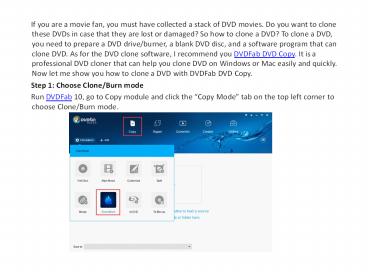
to clone a DVD with DVDFab DVD Copy. - Step 1 Choose Clone/Burn mode
- Run DVDFab 10, go to Copy module and click
the Copy Mode tab on the top left corner to
choose Clone/Burn mode.
2
- Step 2 Load the source
- Insert the DVD disc to your optical drive
and DVDFab will load it automatically.
3
- Step 3 Select the output directory and start
the clone process - Navigate to the bottom of the main
interface and choose your optical drive as the
directory from the dropdown list and then click
the Start button.
4
- Soon after, you can get a DVD copy which
has the same content with the original disc.
DVDFab can not only copy DVD but also rip DVD,
and if you want to know how to rip and convert
DVD, please go to Rip Any DVD with DVD Ripper to
have a look. - Note
- During the process, the original disc
will be ejected and DVDFab will prompt you to
insert a blank DVD disc. Please just do as the
instruction says.
Recommended

