

Export Multiple Profiles of Salesforce in few clicks PowerPoint PPT Presentation
Title: Export Multiple Profiles of Salesforce in few clicks
1
(No Transcript)
2
Intro Exporting Feature of Multiple Profiles of
Salesforce in Few Clicks BOFC
- Salesforce Bulk Object Field Creator help
Salesforce admin and developers in exporting
multiple profiles in xls sheet in few clicks as
earlier it was tedious and time taking job to
copy and click each Profile one by one using
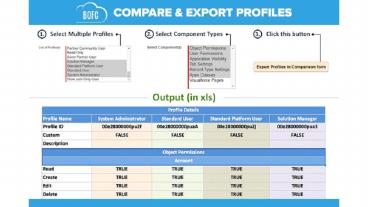
Salesforce Standard process. Using BOFC
Application to Export Profiles user can Export
Object access, App access, Tab access, User
Administrative permissions, record type details,
apex class access, visualforce page access. Have
more queries related to BOFC App? click here
3
(No Transcript)
4
Benefits of using BOFC Application for Export
Profiles
- Multiple Profiles can be extracted in single
click in single xls sheet (with each tab for each
profile) - Supports both Standard and Custom Profiles
- Export includes Object access, App access, Tab
access, User Administrative permissions, record
type details, apex class access, visual force
page access - Easy, Simple, Clickable process to export profiles
5
Steps to Export Multiple Profiles in Salesforce
- Step 1. Open the BOFC Home gt Click Export
Multiple Profiles (Complete Details) - Step 2. It will open below screen for BOFC
Export Multiple Profiles in Salesforce - Step 3. User can choose different actions on
Export screen. - Step 4. On clicking the export buttons, it will
display a small section on the page. This section
show the status of your export for multiple
profiles. Wait for couple of seconds, until
status is changed to Completed in the export
status table. - Step 5. Once status is Completed, your file is
ready for export. Click on Download link to
download your profiles export in xls.
6
Want To Hire US???
Support_at_tech9logy.com
Recommended

