

VMRS%20Code%20Search PowerPoint PPT Presentation
Title: VMRS%20Code%20Search
1
MM03
VMRS Code Search
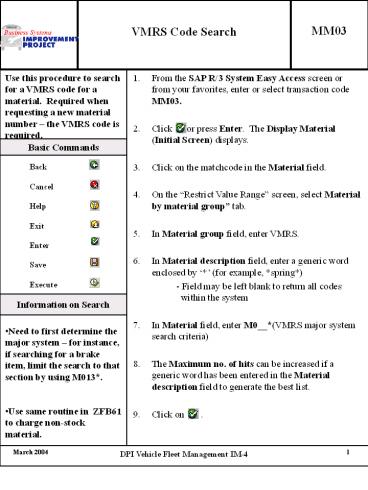
Use this procedure to search for a VMRS code for a material. Required when requesting a new material number the VMRS code is required. From the SAP R/3 System Easy Access screen or from your favorites, enter or select transaction code MM03. Click or press Enter. The Display Material (Initial Screen) displays. Click on the matchcode in the Material field. On the Restrict Value Range screen, select Material by material group tab. In Material group field, enter VMRS. In Material description field, enter a generic word enclosed by (for example, spring) - Field may be left blank to return all codes within the system In Material field, enter M0__(VMRS major system search criteria) The Maximum no. of hits can be increased if a generic word has been entered in the Material description field to generate the best list. Click on .
Basic Commands
Back Cancel Help Exit Enter Save Execute
Information on Search
- Need to first determine the major system for
instance, if searching for a brake item, limit
the search to that section by using M013. - Use same routine in ZFB61 to charge non-stock
material.
Recommended

