

Students using free online tools to support their learning PowerPoint PPT Presentation
1 / 14
Title: Students using free online tools to support their learning
1
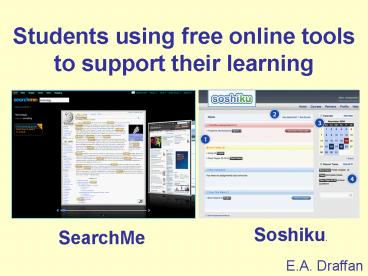
Students using free online tools to support their
learning
Soshiku.
SearchMe
E.A. Draffan
2
The Young!
2,000 hours a year watching TV, playing computer
games or surfing websites compares with 900 hours
in class, and 1,270 hours with their
parents.(Consumer Kids by Ed Mayo)
Becta
3
Accessibility issues
- Some aspects of the e-learning collaboration
applications do not interact well with assistive
technologies or allow for personalisation - Navigability and usability of virtual learning
environments e.g. Blackboard try In-Folio - Forum threads have poor subject lines
- People do not follow the threads accurately
- Easier to use instant messaging, Skype and
social network forums, blogs and wikis etc.
Nick
4
Instant messaging
- MSN, Skype and even Twitter (video)
- LexDis strategies
- MSN for Real-Time Communication
- Facebook with MSN
- Skype for testing knowledge
- Skype for project work
- Issues
- Spell checking
5
Online Spell Checking
- Google toolbar download for any browser
- ieSpell download as extra for Internet Explorer
- Firefox British Dictionary download as add-in
- Safari, Opera version 10 Google Chrome
built-in - Ginger and Ghotit online for errors in sentences.
- Other Assistive Technologies
6
Wikis and Blogs
- Wikis and Blogs in Plain English (videos)
- LexDis strategies
- Blogging as a framwork for writing
- Blogging to reflect on my PhD
- LiveJournal as a personal diary
- Wiki used for collaborative writing
- Issues
- Choosing a good layout and colour for wikis and
blogs - Blogging and checking spelling
7
Social Networking
- Social Networking in Plain English
- LexDis strategies
- Collaborating online Facebook
- Sharing ideas
- Issues
- Time wasting! Use MSN
- Keyboard access to edit boxes in forums
- m-facebook for accessibility.
8
Calendars, Planning and Collaboration
- Online task and time management
- LexDis strategies
- Google Calendar
- Planning using yEd Graph
- Google docs
- Issues
- Accessibility
- Web2Access.org.uk
9
My Technologies - 24/7 access
- Students really value 24/7 access to online
learning materials which allows them to fit
learning into their lives. - Students expect to be able to use personal
technologies and services in institutional
contexts. - Students are creating their own learning spaces,
blending virtual with face-to-face, and formal
with social networking. - www.Web2Access.org.uk
10
Coming up...
- Mobile phones were identified in the Horizon
Report (2009) as the technologies with the
highest likelihood of entry into the mainstream
of learning-focused institutions within the next
year. - http//wp.nmc.org/horizon2009/
11
The phones are changing!
- Devices are coming with larger screens e.g.
iPhone, Touch HD, Touch Pro 2 Toshiba TG01 - Programmes that automatically Reflow Text make
reading easier - Text to Speech no screen needed
- Pico Projection
- (Thanks to Neil Milliken Iansyst)
12
LexDis examples
- Sarah for reminders and reading text
CapturaTalk - Hannah used a Nokia 5500 Sport for text to speech
reading messages - Kim taking photos of
- references on her mobile
- Anne uses the Tasks in
- Mobile Outlook sync with
- computer
13
Free Technologies - AccessApps
- http//adaptech.dawsoncollege.qc.ca/fandi_e.php
- http//www.oatsoft.org
14
Thank You
- E.A. Draffan
- Learning Societies Lab,Electronics and Computer
Science,University of Southampton.Mobile 07976
289103E-mail ead_at_ecs.soton.ac.ukLexDis
Project websitewww.lexdis.org
Recommended

